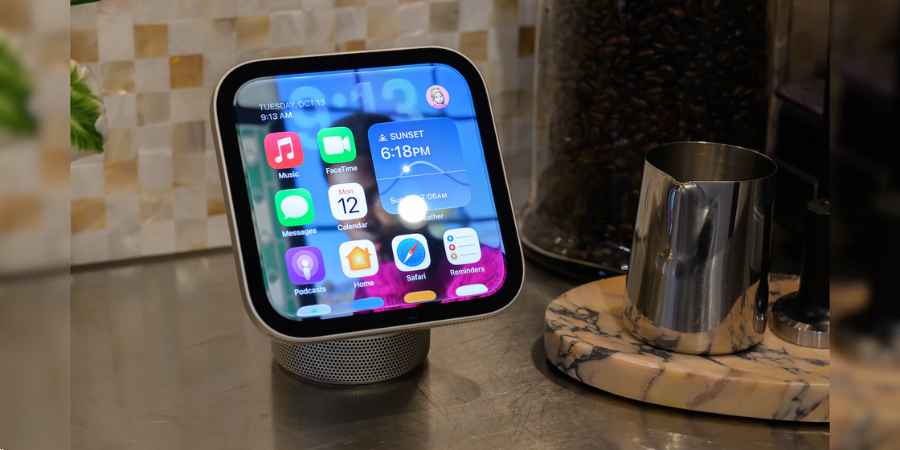
Apple has spent years making it easier to control connected devices through an iPhone, Apple TV or HomePod. With HomeView, the company is taking that experience a step further by putting a dedicated touchscreen in the home. Instead of reaching for a phone to check a camera, adjust the lights or start a video call, users can access these functions from one shared device.
Announced on October 13, 2026, at Apple’s “Welcome Home” event, HomeView is the company’s first dedicated smart home display. It combines a seven-inch touchscreen, a speaker, Siri and controls for compatible connected devices. The starting price is $299 in the United States, with availability scheduled to begin on November 13
The bigger question is whether Apple HomeView will be useful enough to justify another screen in a home already filled with phones, televisions and smart speakers.
What is Apple HomeView?
Apple HomeView is a smart home hub designed to bring household controls, personal information and entertainment into one place. It has a square-shaped, seven-inch Liquid Retina display and is available as a tabletop device with a speaker base or as a wall-mounted unit.
Think of a kitchen where the lights, thermostat and security cameras are connected to Apple’s Home ecosystem. With HomeView, a resident can check the camera feed, adjust the lighting and ask Siri a question without opening the Home app on an iPhone.
The device also supports FaceTime calls, photos, music and other compatible functions. Its camera can recognise up to six household members, allowing the interface to show personalised information when the relevant recognition features are enabled.
The distinction between Apple HomeView and an ordinary smart speaker is the screen. A voice assistant can tell you the temperature, for example, but a display can also show a thermostat setting, a camera feed or a visual control that can be tapped directly.
Apple HomeView Features
1. A touchscreen for managing the home
HomeView gives users a central place to control compatible smart home accessories. Lighting, thermostats and supported security devices can be managed through its interface.
The screen can also display photos, clock faces and widgets. Its brightness adjusts to the surrounding light and can dim to a very low level, making it more suitable for rooms where a bright screen would be distracting at night.
2. Siri and Apple Intelligence
Siri is central to the HomeView experience. Users can issue voice commands to manage compatible devices, ask questions and access supported functions without navigating through multiple menus.
Apple is also bringing its newer Siri AI capabilities into the smart home experience. Certain personalised functions, including features that use information from an individual’s apps and descriptions of security camera footage, rely on a connected compatible iPhone. This means some of the advertised intelligence depends on more than the HomeView hardware alone.
3. Personalised experiences for household members
A shared home display creates an obvious privacy challenge: one person’s calendar or messages should not automatically appear when someone else walks into the room.
HomeView addresses this through user recognition. Its 12-megapixel camera can recognise up to six people, enabling the device to tailor supported information and the interface to the recognised household member.
However, buyers should distinguish between recognising someone and granting access to every personal app or piece of information. Personalised features have device and software requirements, so households should check Apple’s setup and privacy conditions before relying on them.
4. FaceTime and entertainment
The built-in camera supports FaceTime calls, while the display can be used for compatible entertainment and household activities. Users can access music, podcasts, photos and other supported content, making HomeView more versatile than a dedicated control panel.
For example, a person preparing dinner could check a recipe, set a timer and control the kitchen lights from the same device. Someone in another room could use it to make a video call without carrying an iPhone around the house.
5. Smart home connectivity
HomeView supports Matter, a smart home interoperability standard, and acts as a Thread Border Router. These technologies help compatible devices communicate within a connected home.
Compatibility still deserves attention. Matter support does not automatically mean that every product, feature or service from every manufacturer will work identically. Before buying HomeView, check whether the specific accessories you own support the functions you intend to use.
How Does Apple HomeView Work?
HomeView offers a centralized destination for common household needs. Once the device is plugged in and compatible accessories are connected, the supported functionality is available on the touchscreen and Siri.
A typical setup involves three stages:
- Connect the device: Set up HomeView through Apple’s supported configuration process and connect it to the household network.
- Add compatible accessories: Configure supported lights, thermostats, locks and other smart home devices through Apple’s Home ecosystem.
- Personalise the experience: Set up household members and choose the widgets, controls and other functions you want to access regularly.
The usefulness of the device depends on how well the existing home fits into Apple’s ecosystem. An iPhone household with compatible smart accessories may find it convenient to have a dedicated control screen. A household using a mixture of Android phones and devices built around competing platforms may find the setup less straightforward.
This is an important consideration because HomeView is not simply a small iPad. Its purpose is to provide a shared household interface rather than reproduce the full tablet experience.
What is the Price of Apple HomeView?
The US starting price is $299. Apple offers tabletop and wall-mounted configurations, although the wall-mounted version requires a separate mounting and power solution.
|
Detail |
Information |
|
US starting price |
$299 |
|
Display |
Seven-inch square Liquid Retina touchscreen |
|
Camera |
12 megapixels |
|
Main uses |
Smart home controls, Siri, FaceTime and supported media |
|
Configurations |
Tabletop with speaker base or wall-mounted |
|
Colours |
Silver, Starlight, Rose Pink and Space Gray |
|
Pre-orders |
Opened October 13, 2026 |
|
Expected availability |
November 13, 2026 |
For buyers choosing the wall-mounted version, the total cost will be higher than the advertised device price because the required mount and power accessories are sold separately. The price of the complete installation depends on the selected mounting option and any professional installation needed.
Indian media have reported a price of ₹39,900. Buyers in India should confirm the current price, availability and included accessories through Apple’s local store before placing an order.
Apple HomeView vs. HomePod
The Apple HomePod is primarily a smart speaker. It is designed for music playback, voice interaction and smart home control. HomeView adds a dedicated touchscreen and camera, allowing users to see controls, view supported camera feeds and make video calls.
Someone who mainly wants high-quality audio and voice commands may not need HomeView. A household that regularly checks security cameras, manages multiple accessories or wants a shared display may find the extra screen more useful.
Apple also announced an updated HomePod mini alongside HomeView at the Welcome Home event. The two products can complement each other, but they are not interchangeable.
What to Know Before Buying Apple HomeView
The price is only one part of the decision. HomeView makes the most sense for households that will use its screen throughout the day, rather than occasionally asking Siri to turn on a light.
Consider these points before purchasing:
- Check your devices: Confirm that your existing accessories support the Home features you need.
- Consider the iPhone requirement: Some personalised AI functions rely on a compatible iPhone and current software.
- Calculate the full installation cost: Wall mounts and power accessories may add to the $299 starting price.
- Think about placement: A kitchen counter, hallway or shared living area may offer more practical value than a room where nobody regularly needs the display.
- Review privacy settings: Camera-based recognition and access to personal information deserve careful setup in a shared household.
HomeView also enters a market where Amazon Echo Show and Google Nest Hub products already offer touchscreen-based smart home controls. Apple’s advantage is its integration with its own devices and services, but that advantage is most relevant to people who already use them.
What Does Apple HomeView Mean for Apple?
HomeView gives Apple a more visible role in the connected home. Until now, its smart home experience has largely depended on the Home app, HomePod speakers, Apple TV and accessories from other manufacturers. A dedicated display gives users a physical place to interact with that ecosystem.
The announcement also broadens the significance of Apple’s Welcome Home event. Alongside HomeView, Apple introduced an updated HomePod mini, a new Apple TV 4K and smart home accessories developed with LG Electronics and Schneider Electric.
For investors following AAPL, Apple’s stock ticker, the launch is one development to watch as the company expands its hardware offerings. However, the product announcement alone does not establish how much HomeView will contribute to revenue or profitability. Adoption, pricing, accessory compatibility and competition will influence its commercial performance over time.
For the latest confirmed product information, availability and regional pricing, check the Apple Newsroom and Apple’s official product listings.
Conclusion
Apple HomeView turns the company’s smart home ecosystem into something users can see and touch without reaching for an iPhone every time. Its screen, camera, Siri integration and connected-device controls could make everyday household tasks easier, particularly in homes already built around Apple products.
At $299, however, it is a considered purchase rather than an essential upgrade for every Apple customer. The strongest reason to buy it is the convenience of having household controls and personalised functions in one fixed location. Whether that convenience justifies the cost will depend on how much of the home’s daily routine moves onto the display.
5 Takeaways from the Author
- Apple HomeView is a smart home display: It combines a touchscreen, camera, speaker and controls for compatible connected devices.
- The US starting price is $299: Wall mounting requires additional accessories, which can raise the total cost.
- Siri and personalisation are central to the experience: Some AI-powered functions depend on a compatible iPhone and current software.
- Compatibility matters: Matter support helps connect devices, but buyers should verify that their specific accessories support the desired features.
- HomeView is designed for Apple’s ecosystem: It is likely to offer the most value to households already using iPhones and compatible Apple Home devices.